

Starting a PhD comes with a long list of things people tell you to buy, most of which you do not need in month one and some of which you never need at all. On a graduate stipend, the goal is not to build the perfect setup on day one. It is to spend limited money on the few things that pay off every day for the next five or six years: your back, your eyes, your ability to focus, and a way to keep your work from disappearing.
This is a prioritized starter kit, not a wish list. I have sorted it into what to buy first, what can wait until you know you need it, and what to skip entirely. Prices move constantly, so I have left them out; check current availability on Amazon before buying, and never pay full price for something that regularly goes on sale.
The Priority Framework
| Tier | What it covers | When to buy |
|---|---|---|
| Buy first | Ergonomics, backup storage, focus | First month |
| Buy soon | Reading, note-taking, desk quality-of-life | First semester |
| Buy later | Nice-to-haves once you know your workflow | When a real need appears |
| Skip | Common purchases that waste stipend money | Never |
The logic is simple. Anything that protects your body or your data is worth buying immediately, because the cost of getting it wrong compounds over years. Everything else can wait until you have felt the specific need for it.
Buy First: Protect Your Body and Your Data
A laptop stand and external keyboard
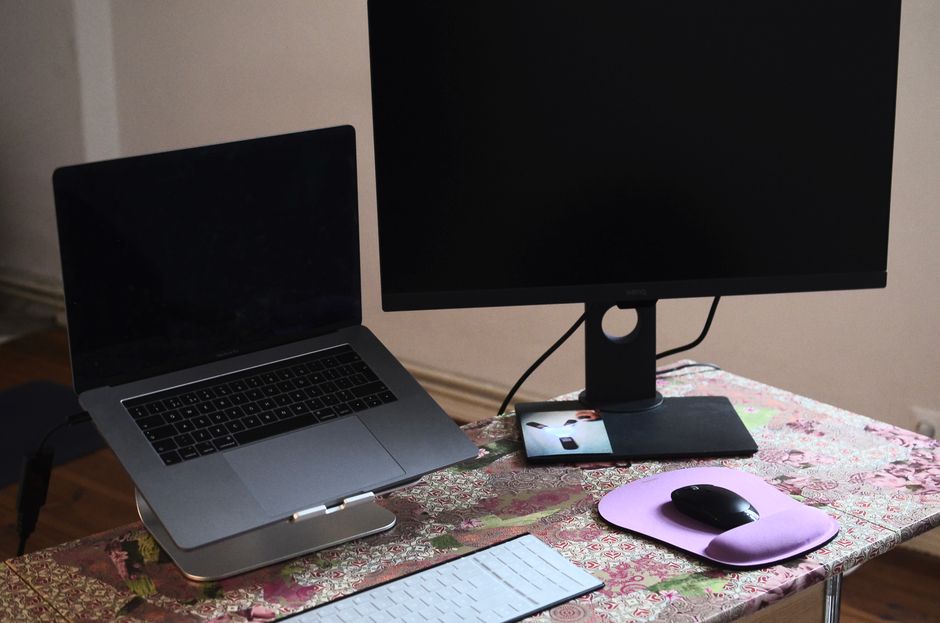
If you do one thing for your physical health in grad school, fix your screen height. Working hunched over a laptop for years is how people develop chronic neck and upper-back pain. A basic aluminum laptop stand raises your screen to eye level, and a separate wired or wireless keyboard lets your arms sit at a natural angle. Together they cost very little and prevent a problem that is expensive and slow to reverse.
If your wrists already bother you from long analysis sessions, add a vertical ergonomic mouse, which keeps your forearm in a more neutral position than a flat mouse.
An external hard drive or SSD for backups
Losing data in grad school is a special kind of catastrophe, and it happens more often than anyone admits. A laptop that gets stolen, dropped, or dies without a backup can erase months of analysis. A portable external SSD is fast, pocket-sized, and cheap insurance. Pair it with a cloud backup and follow the basic rule of keeping your work in at least two places. This is not optional, and it is the first thing I recommend every new student buy.
Noise-cancelling headphones
Shared offices, open-plan lab spaces, and cramped grad housing all make focused work difficult. A good pair of noise-cancelling headphones is one of the highest-return purchases for anyone who needs to read, write, or code for hours. If over-ear headphones are out of budget, noise-cancelling earbuds are a smaller, cheaper alternative that also travel well to conferences.
Buy Soon: Reading, Notes, and a Livable Desk
An e-reader for papers

You are about to read more PDFs than you can imagine, and doing all of it on a backlit laptop is hard on your eyes. An e-ink reader lets you read and annotate papers away from your desk. The Kindle Paperwhite is the affordable entry point for reading, while the Kindle Scribe adds handwritten annotation, which is closer to how most people mark up a manuscript. This is a “buy soon” rather than “buy first” item only because you can survive without it, but most students who get one wish they had bought it sooner. Our e-ink tablet guide covers the differences if you are deciding between models.
A reference manager (free, but essential)
This one costs nothing, so set it up in your first week. Zotero is free, open source, and will save you from the misery of hand-formatting citations for the next several years. It is not a physical purchase, but it belongs in every starter kit because starting your literature organized is far easier than fixing it later.
A paper notebook
Even in a digital lab, a physical notebook for planning experiments, sketching ideas, and keeping a running to-do list is worth having. A durable dot-grid Leuchtturm1917 or a cheaper composition-style lab notebook both work. Match the format to your institution’s record-keeping requirements if you are in a wet lab.
A monitor light bar
If you work at a desk at night, a monitor light bar that clips to your screen lights your workspace without glare and is easier on your eyes than an overhead light. It is a small quality-of-life upgrade that you will notice every evening.
Buy Later: Once You Know Your Workflow
Some purchases only make sense after you understand how you actually work. Do not buy these on day one.
- An external monitor. A second screen is a real productivity gain for data analysis and writing, but wait until you know where you will be working most. If you move between the lab and home, a portable monitor may suit you better than a large desktop display.
- A USB-C hub or dock. Useful once you commit to a monitor-and-peripherals setup, a USB-C hub turns your laptop’s two ports into a full workstation. Buy it when you have the peripherals to justify it.
- Bench comfort gear. If you are in a wet lab, a pair of compression socks and comfortable, closed-toe shoes make long standing days easier. You will know within a few weeks whether you need them.
- An insulated water bottle. A durable insulated bottle helps you actually stay hydrated through a day at the bench or desk.
- A decent webcam. Committees, collaborators, and remote seminars mean a lot of video calls. Most laptop cameras are poor, and an external 1080p webcam is a cheap upgrade for anyone who presents remotely often. Buy it before your first big virtual talk, not after.
Waiting on these is not about frugality for its own sake. It is that your workflow in month one is a guess, and your workflow in month six is data. Spending after you have that data means you buy the monitor size, the dock, and the shoes that actually fit how you work, instead of the ones a checklist told you to buy before you started.
Skip: Where New Students Waste Money
A few common purchases are easy to talk yourself into and rarely worth it on a stipend:
- A tablet as a laptop replacement. An iPad with a keyboard case is tempting, but it will not run the analysis software, terminals, or full desktop workflows most research requires. If you want one for reading and notes, buy a cheaper e-reader instead and keep your laptop as your workhorse.
- A top-tier mechanical keyboard before you know your preferences. Keyboards are personal. Start with something inexpensive and upgrade later if you develop strong opinions, rather than spending a lot up front on switches you may not like.
- Premium lab-branded merchandise. Themed mugs, molecule models, and novelty desk toys are fun gifts but poor use of your own limited money. Spend on things that reduce daily friction instead.
- A high-end printer. Your department almost certainly has printing. Buy one only if you have a specific, repeated need it can solve.
How to Buy on a Stipend
Two habits stretch a graduate budget further than any single product choice. First, buy refurbished or previous-generation electronics where you can; last year’s laptop stand, monitor, or headphones are usually nearly identical to this year’s at a lower price. Second, wait for sales on anything expensive. Major electronics routinely drop in price during seasonal sale events, so if an item is a “buy later” purchase anyway, timing it around a sale is free money.
Finally, remember that the most valuable parts of this kit are the cheapest: a laptop stand, a backup drive, and a reference manager together cost less than a single fancy gadget and will do more for your PhD than anything else on this list.
The Bottom Line
Spend your first-month money on ergonomics, a backup drive, and focus, in that order. Add an e-reader and a good notebook in your first semester. Wait on monitors, docks, and bench extras until you have felt the specific need. And put nothing toward novelty gear until the essentials are covered. If you get the priorities right, a modest starter kit will carry you through the entire degree.
For the non-gear side of getting started well, our guide on how to survive your first year of a PhD covers the habits and expectations that matter more than any purchase.